EasyEffects can apply a generic improvement for most small speakers.
Kittenlabs has a writeup of using Room EQ Wizard to measure impulse response of your specific speakers to create a proper correction. The results are pretty dramatic on a GPD palmtop.
The little Sonos bluetooth speakers do something like this. I went in search of a teardown to figure out how on earth they get any sort of bass response from that size enclosure, and the innards turn out to be kinda boring. The trick is almost entirely from shoving the real-time room response through software correction. If that could be packaged up for Linux laptops, it would be amazing.
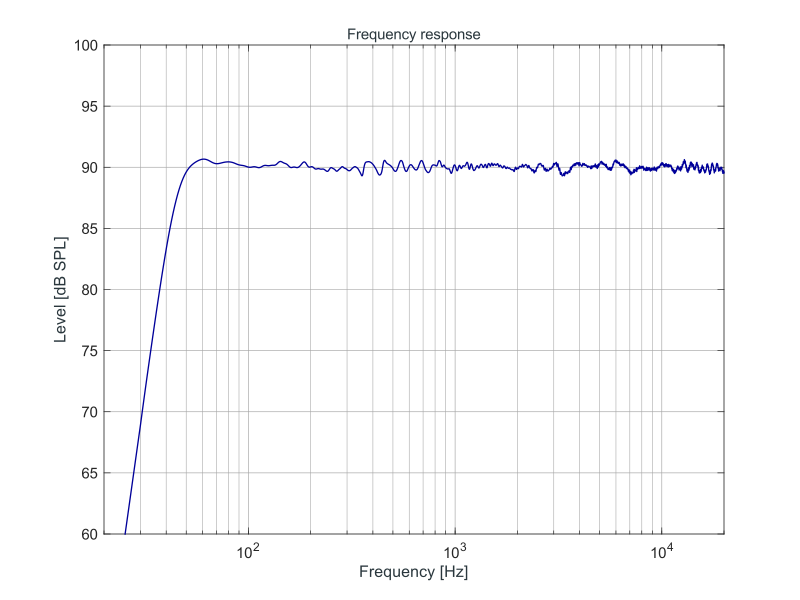
In contrast, small speakers, especially non-round speakers with plastic diaphragms that are commonly found in laptops, have pretty wild response curves, something like this:
I am skeptical about measurements done using the laptop's microphone, though. These microphone arrays are often designed to be very directional, some laptops have bottom-firing speakers, etc.
For most cheap computer speakers and headphones, you can make them sound better for music and gaming simply by boosting low and high frequencies. And for speech, you often want the opposite...
> I am skeptical about measurements done using the laptop's microphone, though.
While any microphone might be able to provide some ballpark info which corrections to start with, laptop mics will be especially poor. Laptop manufacturers consider conferencing the primary use case for mics so they're intentionally placed and oriented to minimize hearing the laptop's speakers. More recent laptops feature far-field mic arrays which often apply DSP processing in hardware such as equalization, acoustic echo cancellation, spatial beamforming and dynamic multi-band compression with little or no control provided at the OS or app level.
If you care about audio it's worth picking a calibrated measurement microphone. It's one of those tools like a multimeter or colorimeter that are just good to have around. Even ~$100 buys a quite good reference mic you can use with REW to improve output from laptop and PC speakers but also home theater audio. If you have or can borrow one of the calibration mics bundled with Denon Audyssey-equipped AVRs, you can download a community-created REW profile for it. Since it's cheap and analog (3.5mm output), it's not as good as any real measurement mic but if you've got one already, it's better than nothing for measuring relative frequency response. However, if you also want to measure things like absolute dB you'll need to measure the input gain of your sound card's ADC with an SPL meter.
My limited and fuzzy recollection is that while the freq response of most cheap to mid speakers is balls, the freq response of most cheap mics is quite good - sure not studio quality, but much better than the equivalent speaker.
IIRC when using REW you're supposed to feed it the response curve of your mic (which you should get at least as a printout with any good mic) + also do a loopback measurement of your audio input.
Couldn’t agree more. This is practically mandatory on a Framework.
Noting too, I didn’t find my profile for Framework 13 to be optimal for Framework 13 Pro. I’m still tweaking there, and frustratingly didn’t track my tweaks, but will try to remember to diff at the end and publish the output.
Mine is a Pro as well. The profile I came up with is far from perfect and I will be tuning it as I go, but it's night and day compared with stock.
One thing I haven't figured out is how to switch profiles automatically when going from speakers to wired headphone. They register as the same audio sink!
I've used https://github.com/cab404/framework-dsp for the preset on mine. There is also a guide from the author of the preset linked in their on how they came up with the presets.
Just seconding this so other framework owners may give it a try. The speakers on my 13" are pretty bad, but using easy effects made them plenty "fine". Without, it sounded like absolute trash.
These are the ones I have been using. I've generally stuck with the lappy_mctopface variant. I have no idea about the naming, but these presets have been good enough for me without much messing about at all!
> In fact, I’d take it a step further and urge desktop environments like KDE and GNOME to properly integrate EasyEffects into their sound settings.
Another important integration point would be the system volume control. If you could EQ your speakers to near flat response, and then apply loudness based on the volume control, you would get great sound at lower volumes without compromising the quality at higher volumes.
I do this currently with EasyEffects equalizer and loudness filters, but for best quality I need to keep the speakers and system volume at preset reference level and control the volume from the loudness filter volume setting.
Some time ago, I’ve come across an Asahi patch to I think Pipewire that tied system volume to a Macbook-specific loudness compensation filter, but I couldn’t figure out how to actually make use of it outside of their environment.
> Third, audio quality is deeply subjective, and what sounds good to my ears may sound like total garbage to yours.
Interesting article (audio processing should be a standard OS feature), but I wish we'd stop doing this. Speakers were never subjective (unlike earphones), they’re supposed to be flat – “equalised”. At least if you want to hear the thing as it was mastered.
I think it just hurts consumers in the end, as it validates snake oil in the form of various ”enhancements”, like image processing on TVs. It makes stuff really hard to compare and much easier to sell shitty hardware.
Not that I’m opposed to improving shitty hardware with software, – quite the contrary – it’s just the murky subjectivity that irks me.
No speakers have flat frequency response. If that's the target (it usually isn't[1] even with very elaborate systems that include a great deal of DSP grunt, in my experience), then they all miss -- every single one of them misses.
All speakers have resonances that add to the sound in ways that frequency response, alone, does not measure. All speakers also have imperfect dynamic response. All speakers have imperfect impedances, which can matter quite a lot to the power amplifier that drives them. All speakers have non-linear phase response. All speakers have different dispersion characteristics.
All speakers then operate within acoustic spaces (like a room in a house) that introduce even more variables.
Plenty of exemplary (according to CEA-2034-A) loudpspeakers once you shop in the active category, including low THD/IMD at high SPL and optional phase linearization to lower group delay.
I'll bet you a beer that if we had examples of each in a room and spent the time to iterate upon setting them up in the most-optimal of ways that can be concocted, and then went through all of the motions of doing controlled, equatable, blind A/B/X listening: We'd still find that we prefer one loudspeaker system over the other.
And our preferences might not even agree, and that's OK. :)
I really suggest you get more into the NRC/Harman research about the subject. Individual preference does exist, but on average it doesn't. Same way that some people prefer more or less salt in their dishes, but you quickly converge towards a unique proportion when averaging those tastes obtained via rigorous blind testing (very important).
Said convergence happens for tonality: people do prefer neutrality as in lack of linear and nonlinear distortion (thus relatively constant directivity in order to get said neutrality when the reflected and direct sound sums).
Where there's still some considerable variation is the amount of directivity: some people prefer it wide to get stronger late reflections that give a sense of envelopment and others prefer it narrow to remove more of the room from the global sound, to hear more of the recording (like headphones).
If the research shows that there is only one optimal way to paint a portrait, or to construct a pizza, then: It is my inclination to reject it. I do not want this kind of homogenization in my world and it is my motivation to destroy it.
> Speakers were never subjective (unlike earphones)
I don't think this has been true in my lifetime, at least. Some brands being known for "warmth" vs "brightness" is ages old, before the idea of audiophile earbuds was even a thing. At the extreme end, you can go back at least 40 years to see people with dedicated sub outputs and massively-oversized non-flat subwoofer setups.
Sure but they’ve always been mastered with the same setup, so the bar has not changed. And anything flavoured will not work universally for all types of music or other kinds of audio (like voice calls are really hard to understand with bassy speakers).
Mastering is done with the target in mind. There's tons of great videos by Masahiro Sakurai (Creator of Smash Bros.), one of which covers how they use typical household TVs to tune the audio/video for the game because relying on top-end audio/video equipment will result in worse results for the player.
Speakers, at least the great majority of them, are not flat. Can you not hear differences between speakers? Studio monitors typically aim for a flat response, but most barely make an acceptable approximation. And then we're not even discussing phone and tv speakers or the fact that a flat response for pure tones doesn't necessarily translate to one for complex sounds.
I have heard that audio engineer's don't necessarily master to a flat EQ because such a small section of listeners are listening with a flat EQ. Most are using car speakers, airpods, etc so they master it based on those expectations.
Can confirm. When I was in that world we'd have a shitty boom-box on a shelf that got pulled out for exactly that purpose. But you'd always start from the studio kit and work down, never the other way.
In my understanding, this whole thing is basically 1:1 with color spaces in display tech, except with pictures/video you at least get to encode what you targeted, versus with audio, you don't.
Yeah that's pretty good way to put it, except I'd say the average person is using way better screens with smartphones than the quality of speakers/headphones their using.
Why would speakers be any different than earphones? Botu are subjective ; I personally hate flat eq. I've listened to numerous products, some worth thousands of dollars, and I'll always take some sort of slight bass and treble boost over flat eq. I'll even take a big bass boost over no bass boost at all.
Earphones are forgoing the outer parts of your ears and skull.
Speakers don't; a "good" speaker setup with eyes closed and no wind/perceptible airflow and no smell and truthful thermal radiation surroundings is effectively indistinguishable from the real place.
Like, literally.
It's not _possible_ with earphones because you can't not feel their presence without being numb on a good bit of your head.
Tangent, but I found that a bass shaker / transducer massively improved my speaker experience without requiring a subwoofer. I built the subwoofer first, but it would annoy everyone around me and it was really spotty depending on its location, the exact layout of the room, etc. Slapped a bass shaker underneath me and it really completes the experience without annoying everybody else.
> Why would speakers be any different than earphones
There are various "ideal" EQ targets for earphones depending on what your model of an ideal audio source is. They all start with a flat response speaker, from then you can model:
- Two speakers right next to the listener's ears. (flat)
- A single speaker 1 metre away in the x axis, in an infinitely-sized anechoic room. (free field)
- Two speakers 30 cm away pointing to a plastic torso at a 90° angle, in a room with reverberations. (B&K/Harman)
- A spherical room lined with speakers, point listener in the centre with no reverberation. (diffuse field)
- An infinite wall of speakers 1 metre away in the x axis. (another method for free field)
The definition of sound quality tends to change between people.
My definition is pretty much the same as yours here, but I know quite a few people who hate listening to music on anything with a relatively flat frequency response.
I had to go on a bit of a journey figuring out how to do anything useful with EasyEffects when I moved to Linux on my Microsoft brand laptop. I question the value of including it by default though. As the article notes, it's easy enough to install manually, and most people won't have any idea what to do to configure it usefully. Even after all my research and tweaking, my audio still has quirks that I don't even have the vocabulary for to be able to find fixes.
> most people won't have any idea what to do to configure it usefully
This was me.
Never had a problem with typical eq/effects and even dabbled in dsp/synths but was defeated by EasyEffects. My attempts at basic tweaks had terrible consequences. I'm sure it was pebkac but the experience felt buggy e.g. my attempts to reduce some painful treble caused the bass to vanish, adjusting volume caused static not loundness etc. Most of the modules have more cryptic numbers than I know what to do with giving the feeling of being trapped in an algebraic equation.
However, downloading some community presets and the results were excellent. Some tiny nudges from there were within my idiot grasp.
Would be sweet if it could use the microphone to auto-tune the speakers by playing audio and listening to the result. Microphones are not perfect but a cheap microphone has much better frequency response than cheap speakers. If you assume the microphone is perfect you will get a pretty good result, probably better than a generic "laptop speaker" preset would be.
i use EE on my parents tv (minipc connected to offline 4koled) to address the "movie too quiet then way too loud" for them but there is a cost, latency
fortunately its not large enough to notice unless you already know (i.e. problem for me but not for thee) AND fortunately MPV .conf can set audio offset globally to sync everything nicely, so its not bothering them; but i disable it if im going to play games where i need split second audio cue/reaction
the lack of vst support though, seems like a terrible oversight. obs audio filters with stacked vsts and routing filters can unironically do this programs job better because of the vst support, and depending on the setup choices, with better latency too
Additional latency can also be dealt in ways that are probably good-enough for streaming/local media. Just make sure the audio output stack has a fixed latency and then adjust Kodi's audio offset to work with it.
carla!! of course how could i have forgotten, i tried to figure it out a few years ago when i was still new to linux but got completely lost on the basics
If you have a thinkpad, you can probably extract the XML configuration from the windows driver installer using innoextract for your laptop. Then you can map those to pipewire settings with wireplumber to get very similar output to windows which was tuned in labs by the manufacturer (minus dolby atmos/dax).
Here is one for a recent thinkpad p1 gen8, no app necessary.
Laptop Manufacturers fail to appreciate how much better their product would be with good speakers. Particularly in today’s age where everyone is streaming music or watching videos much more than before.
I wouldn't be at all surprised if Macbooks were doing the same sort of room-monitoring real-time EQ tricks that Sonos speakers do. They own the hardware and the software, there's a real advantage to them in having such tight control over the audio environment.
> EasyEffects does take up a tiny fraction of CPU power (I’m talking 0.1-0.2% according to KDE’s System Monitor), but I have never seen it have any noticeable performance impact on anything.
I'm mostly a Windows/Android user, but one thing I appreciate about Macbooks is that the speakers are quite capable. I have a MacBook Pro from work and the speakers sound excellent, at least for a laptop.
The audio design in Macbooks is intense. Fixed hardware so they can tune the hell out of it. Multiple mics for directional sensing - I don't know if they use that for real-time tuning, but I wouldn't be surprised.
If the aim is to achieve a "flat" sound response, you could take it one step further and use a microphone to check how it sounds in a given space. Like Sonarworks SoundID. Some studio monitor speakers have this built in. Treat the room, position the speakers, put a microphone to the listening position and apply a (often wild) EQ curve until the response is flat (enough).
I also often need EQ in the reverse situation, when I need less bass through my nice studio monitors when watching TV. Otherwise I’ll be watching Star Trek with dialogue at a normal volume and BOOM, the loudest photon torpedo you’ve ever heard.
If you're watching through VLC, you can set the mix to stereo in the audio settings - perhaps there's a similar setting you can find? Not sure if you've got the tv's optical going straight into an amp. Some stereo receivers also have a "night mode" that can do this, you might find an older cheaper one with pre-outs or similar.
I'm not having an issue with laptop with subpar speakers, but I don't see any way of not using EasyEffects. I'm running Arch on a Beelink SER8 through a focusrite 2i2 and into my Sony stereo receiver, out to floorstanding speakers. At the moment I am just using a slightly modified variation of one of the common community plugins, LoudnessEqualizer. For better or for worse, my ears are so accustomed to this. Elsewhere I also use it for things like dialogue boost and it surely does feel like overkill then, but convenient.
Now I am about to dig back into my Bitwig DAW, something I haven't done for many years, and dealing with all the issues around clean vs EasyEffects-modified sounds is daunting.
Shout-out to the PEQdB Diamond Target and the IG955, iykyk. I use those EQ filters to make my music listening experience considerably better. Your audio equipment most definitely sounds bad by default and needs equalization.
I can't find any before/after audio samples - can anybody point any out? I'd have thought it's about the first thing you'd do to show off the differences (I get it - it might not (probably won't be (?)) be tuned for my particular speaker... Still wouldn't hurt to hear an example).
the DSP at play here is more than just an equalizer, and as such an audio file cannot be produced to illustrate the differences in a meaningful way to unknown target speakers
Most windows laptops will do something like this by default to enhance the sound. Part of what ships as "Dolby Atmos" is some EQ-ing and normalization, with the default not being flat. It is just necessary to make those tiny laptop speakers sound half decent and not crap out all the time.
You can actually extract the Dolby Atmos settings and run them under either EasyEffects or natively under Pipewire without EasyEffects, using the Python script at https://github.com/antoinecellerier/speaker-tuning-to-easyef.... (Tested on my Thinkpad, works great).
Does this make everything sound like those shitty gen Z speakers you hear everywhere these days? As someone into high end audio I really dislike that sound.
Since pipewire landed in arch all my issues with sound magically vanished. It's a really great piece of software. Maybe it's even worth to change the distro.
I recommend trying out PulseEffects, my understanding is that EasyEffects is the same project they just did a rename of it. You might be stuck on an older version or something not exactly sure.



Kittenlabs has a writeup of using Room EQ Wizard to measure impulse response of your specific speakers to create a proper correction. The results are pretty dramatic on a GPD palmtop.
https://kittenlabs.de/blog/2025/04/06/gpd-pocket-4-speaker-d...
HN post: https://news.ycombinator.com/item?id=43635295
reply