> Ubiquiti also hinted it had an idea of who was behind the attack, saying it has “well-developed evidence that the perpetrator is an individual with intricate knowledge of our cloud infrastructure. As we are cooperating with law enforcement in an ongoing investigation, we cannot comment further.”
I personally don't believe this. IMO, this is a company who is looking for a fall guy, and _most likely_ it's going to be somebody who raised a stink about all the security problems during their time there.
Form your own opinion, I'm just a guy who worked at Ubiquiti for a year, raising all kinds of hell about the security, architectural, and operational problems that I saw while I was there.
That would be the reverse of the usual strategy, wouldn't it? Most companies seem to try to pin breaches on sophisticated hacker groups backed by nation states. But then, they benefit from the perception of a threat that's impossible to defend from (so there wasn't anything they could do) - whereas Ubiquiti benefits from people thinking the attack was just a small actor that couldn't possibly threaten Ubiquiti's customers.
Yes, you're right. But I don't really expect them to make the "smart" or "usual" play. That would honestly surprise me. Now, pinning it on somebody that was generally disliked because they constantly blocked things that had obvious gaping security holes? Basically sicking law-enforcement on somebody out of pure spite? I can absolutely believe that.
Accusing whistleblowers and reporters is indeed common - it pretty much seems the standard behavior in infosec in particular.
What I meant was something different. The breach, as I understand it, was quite critical. Ubiquiti in this case could take the standard corporate spiel of "it has hallmarks of a nation state attack, there was nothing we could do" bullshit disclaimer - but given the nature of this breach, every customer of theirs would now be wondering if $Enemy has put malware in their infra, and whether it isn't a good idea to smash it all with a hammer and buy new one from someone else. So I suspect Ubiquiti is going the other way, blaming it on a single, inconsequential individual, that absolutely, positively didn't give access to anyone else, and thus nobody's infra was in any danger.
(Note: I have no inside knowledge, or even any deep knowledge, of this topic - I'm just a random Internet person speculating.)
Nah, most of the time it's just a fancy infosec way of saying "it was likely ordinary criminals, or even some script kiddies, but it would be quite embarrassing to admit that".
Thanks! Aha, so "state" here refers to the people running the country?
Rather than the citizens / "all people living there", (or geographical area)
So, could be organizations indirectly paid by, just an example, Putin or the CCP. But who the people in Russia or China don't know about (and might not have supported). -- I'm not a native speaker (I guess you've noticed :-))
I really wouldn't like to migrate away but I can't say all the info that's been coming back has been making me want to have them as a part of my network infrastructure.
I want to fire Ubiquiti, but where can I go to get my router, wireless access points and switches in one management interface? There are plenty of poorly performing consumer grade options out there which hide all complexity, but they break in fun ways (eg: Google WiFi creating loops in the network when users try to do wired backhaul) and only tackle part of the stack.
I really just want to manage an OpenWRT based network with one central web interface and not have to deal with corporate/state entities deciding to push fun changes out in the management interfaces that power these systems.
I keep seeing the requests for central management interface, which leave me somewhat puzzled. Why do you need in a home environment? I run a small network with one big router and several access points, and at least with Mikrotik's gear, it's pretty much fire and forget. It has CAPsMAN[1] to centrally manage wireless networks, but I've found it to introduce unneeded complexity. Auto-updates[2] don't need any central management either. Monitoring can be done through SNMP[3], and there's a REST API too[4].
I have a good deal of experience with Mikrotik's offerings, and I am not looking to power networks I support with a patchwork of different systems that each have their own interface.
Most of the value proposition of the Unifi lineup is I can look at a single website that I host and see the WiFi clients connected to an access point, what switch feeds that access point internet (and whether its linked at gigabit or 100Mbps), uptime on all devices involved in the stack, whether the client has poor WiFi quality, trouble DHCPing, etc.
The single pane of glass to view everything when I am many miles from the networks I support is essential. Compared to when these sites were on PFSense before migrating, these networks have improved uptime, rapid remediation of issues, and changing VLANs, SSIDs and labeling each client on the network is a snap.
Edit: Borrowed /u/bpye's single pane of glass term
It's definitely not all the new controllers, although with the UDM line you might be right. I think there's a huge intersection between people who would buy those specific devices and people who are perfectly happy to have remote access to their control plane in the cloud.
It is also about dark patterns. I never had the cloud option enabled. One night after a long day I upgraded the controller software. I noticed a message like “do you want to login?” and wasn’t awake enough to realise that it asked for my ui.com account and that after that cloud management was enabled and my phone switched to authenticate from a direct connection with the local credentials to using the ui.com credentials.
It looks like what I was referring to is that they recently made the initial controller setup on the cloudkey require a cloud account [1], but you can migrate to local only after the initial setup.
So the only remaining 'local only' from start to finish is for self-hosted I guess.
I have a cloud key gen2 plus and do not have a UI.com account. I would classify getting the network controller setup without having one initially "mildly annoying but worth it".
I'm also floored at the number of people who are spinning the existence of a self-hosted controller as somehow a bad thing...?
The UDM and UDM-Pro force you to set up a UI.com account, and cannot be used with external Unifi controllers like one you might run on a server, PC or cloud key (Ubiquiti's management software on a Power over Ethernet powered dongle, does not require a UI.com account).
They do - first thing I did though was then go in and add a local account, and disable remote access (I have a wireguard tunnel that terminates on a server behind my firewall if I need remote access).
I don't use a UI.com account to connect to the Unifi controller I host (as I don't need their inconsistently working NAT traversal to get to my controller), hopefully the networks I support are safe due to not being entangled with Ubiquiti's cloud infrastructure.
Anyone who is forced to get a UI.com account (eg: UniFi Dream Machine and UDM-Pro owners) should change their credentials and do a factory reset on their routers and Access Points ASAP.
> do a factory reset on their routers and Access Points ASAP
This is a miserable user experience. If you do a reset and don’t know the SSH password on APs or cameras you get to spend a hellish few hours crawling though ceiling insulation, climbing ladders and physically resetting devices. It’s so shit. I’ve just done it, but not due to security concerns, but instead because of a UDM-P crapping out randomly.
This is why I like having the controller in a virtual machine offsite. Factory resetting the router and pairing it to the same site in the separate controller gets me back to the same exact place I expect to be.
With the UDM series, the integrated controller ensures you lose everything if you have to factory reset, site to site VPNs have to be manually configured, and numerous other minor annoyances crop up (like UI.com not always being able to connect to the controller).
>If you do a reset and don’t know the SSH password on APs or cameras
Who's fault is that if you don't have it? First thing I do when I set a new site up is record all the vital information like that for when I will inevitably need to recover stuff.
It should be standard backup/disaster recovery practices - for ANY system. Making sure you have critical information BEFORE you really need it is preparedness 101.
Similar to the other responses, it's the fact that I can manage my network remotely from a simple app or UI. This helps me answer phone calls from my family asking why Netflix doesn't work on TV #2, when I'm not at home. Won't solve all problems, but at least I can narrow it down and troubleshoot.
And I like the fact that I can an overview of the state of my network; one of my wired links to an AP would degrade to 100 Mbps at times, and being able to see the link speeds easily was very helpful (it was a bad ethernet cable in the end).
Before I moved to Ubiquiti I had a spate of problems with my fiber broadband, which would stop working for a few minutes at random, resetting my RDP connections. I had a vendor-supplied Linksys (I think?) router, and trying to troubleshoot it was painful. If I ever have such problems again I'll have much better diagnostics.
That said, I won't buy any Ubiquiti gear that requires the cloud, and my faith in the company is eroding. But, like others, I would be at a loss what to replace my gear with at the moment. I just hope it'll function well enough until either Ubiquiti gets it act together (again?) or a viable competitor arises.
Network cables (copper and fibre) have a limited bend radius. Most people don't think about this and will bend a cable beyond tolerance, which will eventually result in the cable not working correctly, and/or manifest as intermittent issues.
I suspect that's the most common cause of network cables 'going bad' in the home.
I learned this back in school, when the previous years students had laid new Ethernet cables from the classroom to the server room, but the machines would only get 10M and not 100M link as they should.
Didn't take us long to notice they had laid the cable like electricians, neatly following the contours of a few door frames with tight 90 degree bends.
> I keep seeing the requests for central management interface, which leave me somewhat puzzled. Why do you need in a home environment?
Crap wifi was a huge thing I dealt with. Unifi fixed that completely. The ability to run a relatively complex network (by home network standards) with multi access points is nice, but the ability to administer them without CLI interface is great. I loved my edge router but touched it with trepidation. It was rock solid except when I was sucking with it. Unifi suits/suited the enthusiastic amateur.
> I run a small network with one big router and several access points, and at least with Mikrotik's gear, it's pretty much fire and forget.
Unifi used to be too, with an interface that was a bit difficult to navigate (settings spread among about 20 tabs, but it was possible to get the job done without sshing to components).
Now it’s flakey. I just rebuilt my last week which was working fine but I couldn’t log in and the UDM-P screen said it required resetting. Dark times.
To answer this for me personally (and I suspect this is a pretty common answer): To use the best, and to explore technologies that I might suggest to business clients.
Business clients love central management interfaces.
As well, I’m honestly kind of done with managing fiddly “snowflake” devices, and central management interfaces usually come with the ability to standardize the config across devices.
I definitely don't "need" it. But it's veeeeeeeery convenient. Especially when it comes to security, being able to see which devices have updates and perform them all from one screen, is extremely convenient. I'm highly interested in paying for convenience at home.
Thankfully I don't use their cloud based management interface -- as far as I know this breach does not affect my local UniFi Controller. Hopefully this is a rude awakening and Ubiquiti goes back to their old consumer focused approach.
Frankly I wonder at how big some of these peoples' houses are. My single seven year old Nighthawk router covers an entire 2300 square foot home and penetrates the brick walls to reach halfway up the street.
That’s not my experience, all the way from Meraki enterprise access points to the standard consumer WRT54GL.
First problem is 5GHz is terrible at going through walls, I don’t believe it will even go through a single brick wall and maintain decent bandwidth. Even 2.4GHz is considerably slowed by 2 or 3 drywall/plywood obstructions.
Second problem is can the mobile device you’re using return that signal through all those walls to the access point. I have noticed an huge increase in quality and snappiness of FaceTime and other high up and down bandwidth activities once I added more access points so that connections are going through only 2 or 3 walls.
For another reference, I have a hotel that needed to upgrade its network to meet the brand standards for signal strength in all the rooms, and we had to end up installing 6 access points in the drop ceiling of each hallway 15 guest rooms in length (each guest room is ~15ft wide, so the corridor was ~225ft long). It resulted in the elimination of almost all guest complaints about the wireless network.
Mine's only slightly larger than that (mostly by virtue of having 3.5 levels, not by X-Y size), but the original plaster walls attenuate the hell out of 5GHz signals. I have two APs, one in the basement and one on the second floor and even with that, I'm considering adding two more inside and a dedicated one outside to serve the patio/BBQ area as I can readily tell the speed difference to internal file and backup servers if I'm in the same room as an AP vs on another floor or outside.
Make no mistake, it still "works" with just one, only slower.
Somehow I have managed to spend most my time in a house that has concrete and brick stopping 5G, a house with wooden walls that block RF and foil insulation under the floor which is even worse, and a workplace environment that has literal faraday cages all around.
I like UniFi in wall access points in the room I’m inside.
My house is about that size. My detached garage is 400sqft. My barn is 1600 sqft. And my travel trailer is 37" long. My network comes into the house and the wireless needs to cover all of the structures because we need into in all the places. It's all spread over about an acre and a half. I run ethernet to a PoE AP in the garage, through an overhead crawl space that covers thale span between the house and the garage, I have b2b radios between the house and barn and the trailer has an LTE router/wifi repeater that picks up wireless from the barn.
Not super complex but no single nighthawk is gonna do it and the unifi management interface does the job. I'm not cloudy though.
Probably not big by US standards, but WiFi attenuation across multiple floors is such that an AP in the living room won't provide any decent signal one floor straight up. Depends on the materials and layout of your house...
This also means you can re-use a frequency with just one floor in between and no issues, and with a horizontally directional antenna, possibly even on adjacent floors.
I run two AP's hard wired to the PoE switch in my closet. These AP's being in the hallways on opposite sides of my home. I run them at lower power so I don't have an excessive amount of RF blasting into neighbor's homes, but I still get good signal quality to/from each AP. Because I now have two AP's running on different channels I've effectively doubled my network throughput overall.
One important thing to think about when planning your WiFi deployment is if you have things that have poor connectivity, everything on that channel suffers. I can have several devices running at several hundred megabits of quality, but a single device being really slow bogs down the channel and suddenly everything else starts getting lots of jitter and overall poor network performance despite most devices having good signal quality. Also, your device may show it has good signal strength but it might be poor quality (bad SNR) so in reality its a poor link speed. Having things physically closer usually results in better average SNR, meaning higher speeds for everything on the channel.
Also, as others have mentioned 5GHz might make it through a wall without a lot of stuff in it, but its not going to penetrate very well through several walls. Having my AP's in the hallways means there's usually only one wall with minimal stuff in it between a device and the AP, so each device usually reports at least several hundred megabits of throughput possible.
I feel the same way - my Nighthawk is going strong with custom firmware, but my friends with Ubiquiti gear try to get me to replace it with a bunch of Unifi stuff every time I talk to them.
Depends a lot on the house. My house is <2000 sqft, but signal, especially 5Ghz propagates poorly though old school plaster walls.
It wasn’t a problem until covid when multiple meeting or other streams just performed poorly on a marginal network. The Ubiquiti gear made it easier to run antennas for optimal signal.
The hot thing to do is to shit on them, but I’ll be sticking with it. They’ll emerge better from this crisis and if you think that any competitor in this price point is better, you’re delusional.
COVID had me setting up more UniFi APs. It held up incredibly well for moving large files across VPNs and running multiple Zooms for work places and school.
COVID must have been a massive boost to their bottom line.
I’m no market analyst, but the last year, even including the last week, has been very good to Ubiquiti.
My house had a problem since the cable came in on one corner of my house, and my office was on the other side. Browsing was ok but things like video calls suffered, at least until I went with a Unifi BeaconHD.
Getting signal to devices isn’t a problem, but it’s not easy having an AP receive signal from a low power device. Multiple APs is the way to go in my experience.
People want a power-user Meraki for the home that isn't tied to a cloud service. It's really as simple as that. Ubiquiti gave them that until they didn't. And now the inevitable breach has occurred and users are looking for a replacement.
Its pretty simple, having each device individually managed is archaic, a pain in the ass and there is no technical reason why it has to be that way.
Skipping wifi 6 seems like a smart move, with 6E on the horizon. It includes all the things that should have been part of the standard in the first place, so why get your hardware certified for 6, if you have to get it recertified for 6E anyway shortly after?
6 doesn't add very much over 5 in real world setups, very few devices even support 802.11ax yet, and the bleeding edge has never been Mikrotik's target segment.
6E gear is not really available anywhere yet, so it's really only an issue for people who just have to have the latest gear at all times. For the majority of people, 802.11ac/wifi 5 is what their hardware supports, so that's what they need.
As far as I know, that concerns 802.11k/v/r, MU-MIMO and beam forming, which many other 802.11ac devices also don't support, so it doesn't bother me. Then again, I'm not running an enterprise setup and I've never been one to meticulously make sure I get every single feature in the world on a spec sheet.
The hAP AC² serves my home networking needs quite well, with an additional AP to better cover the whole apartment.
It's an interesting idea to have a single pane of glass management experience for OpenWRT - given that all config is under UCI [0] it seems very possible. One of the things on my todo list is to try and get Nix to push config to my Unifi APs when I flash them with OpenWRT.
I know TP-Link is no Ubiquiti, but I run two identical small networks (VR-2100 routers with RE-200v4 extenders running in mesh mode), and it's pretty solid so far.
You can access your network from Tether app via cloud if you wish, too. When you enable Mesh, everything is controlled via the router. You don't need to manage anything on the extenders.
RE200 can work as an AP if you can get them a CAT5, or can provide wireless to Ethernet capability. I don't need home-wide VLANs and other exotic stuff (for a home network), but you can adjust QoS on the router in three levels and it has an embedded OpenVPN server if you fancy.
While not network related, you can temporarily or permanently turn off all LEDs on the devices so they don't create any light pollution, something I love to have.
All in all it's a great package, for my home network, at least.
Keep an eye on the Cisco Small Business line - no subscription, firmware updates without an account (yes, I am still talking about Cisco) and while the management console is a bit weak, I'd wager Cisco will mature faster than UBNT can get their crap together at this point :p
> Google WiFi creating loops in the network when users try to do wired backhaul
That's very surprising to hear. The decades-old spanning tree protocol can prevent that. I in fact have a friend who has done the exact same thing (Google Wifi with wired backhaul) with no problems. It switches from 802.11s to STP with no problems.
During this week I've been playing around with replacing my USG with my existing home server - it already has two NICs - my first thought was to run OPNSense in a VM but nftables on NixOS seems to work well enough - there are a few examples floating online [0,1]. OpenBSD even supports the USG [2] but I couldn't think of much reason to keep the extra hardware.
The next thing I want to do is reflash my Unifi APs with OpenWRT [3] - the hardware is fine, but at that point I'll get all the support without the controller software.
My home environment is fairly basic so moving away isn't too hard - this would obviously be much harder for a small business...
That’s odd, the link works for me but the wiki was very slow earlier. From what I’ve read Ubiquiti have made it harder to flash new hardware, but even the new ax APs are supported by OpenWRT. There is a commit with some info - it seems there is a way to disable signature verification [0].
I _do_ run opnsense in a VM and am very happy with the setup. My requirements for APs are simple but hard to satisfy. Ceiling mount, PoE, present-day-best 802.11 standard, and openwrt-capable.
I had assumed a setup which had several VMs, with one being a PFSense or similar to be less secure than a standalone firewall. Reading about the pros and cons leads me to conclude that security in a virtual setup is just fine.
I mean, don't get me wrong, there absolutely _is_ somebody who's responsible for it, but I wouldn't place any money on Ubiquiti being able to figure out who it really was.
They want to brush this under the rug as fast as they can, and that means using the opportunity to pin it on somebody that's been "problematic".
Given they were stupid enough to spin up some VMs, I doubt it was someone that knew what they had access to. A skilled attacker would stay dormant sucking up all data accessible via the AWS API (including s3 stuff) and potentially keep access to the infrastructure for years.
This kind of analysis is basically worthless because you don’t know whether they are operating at multiple levels of deception by, e.g., making you think they are a stupid script kiddie and that you successfully wiped them out.
If they had root access to an AWS account, this is exactly what you would expect.
If there's a cyber security firm that's been hired to provide analysis they're going to be combing through egress traffic to find anything suspicious. But, egress traffic is difficult and expensive to analyse.
Worse yet, the attackers could easily just sit there and not use their attack methods for a little while and start up their compromises in weeks or months. You couldn't be certain nothing's still there till you ripped the AWS resources out and replaced them.
And if it is happening, we might hear about that in a few years' time, if it's discovered, and if it's brought to light in circumstances that are conducive to the vendor making a public disclosure (eg. which are impossible to cover up).
Heh... no. I quit two years ago, well before all this happened. I have ideas about who this "Adam" is, and I also have some suspicions about who they're accusing as the culprit. But that's all they are. Hunches.
That may have worn thin, nowadays. The average response here would have been described as cynical in the past. The Russia/China scapegoat had been way overused to the point where I'm cynical every time it comes up probably even where it's actually true, one time in a hundred or whatever.
Nobody blames the NSA in these circumstances, ever.
> I'm just a guy who worked at Ubiquiti for a year
Would you be able to point to unofficial compatible operating systems for Ubiquiti devices? I want to remove Ubiquiti software from the devices I bought and paid for.
When I'm bored, I sometimes intentionally take comments out of context, just to see where they go, I know this isn't what you ment, but I like to pretend:
>Form your own opinion, I'm just a guy who worked at Ubiquiti for a year, raising all kinds of hell about the security, architectural, and operational problems that I saw while I was there.
You are a lawn man/woman.
Security problems: I have to show my badge EACH TIME I go to the bathroom
Architectural problems: these bricks are the WRONG COLOR!
Operational problems: The painters used the WRONG COLOR OF OFF WHITE!
Again, I know this isn't what you ment, but I enjoyed transposing a well written critique of their software from (presumably) a knowledgeable software guy into a lawn person in a jumpsuit.
Mentioned it before, but since a few days ago my unifi devices (2 wifi APs, a small switch, plus one Debian VM with the controller, all on it's on VLAN) are not allowed to do outbound traffic anymore, with the exception of NTP, DNS and one trusted apt mirror.
Looking at the firewall logs it seems the devices try to ping (ICMP type 8) a bunch of AWS IPs every few hours. The controller tries to connect 80/443 on different AWS IPs a lot more often, even without me navigating the web interface. Other than that, no ill effects. Device firmware update notifications are gone, just says "up to date" now.
Interestingly, I still see the ad for their "dream machine" on the dashboard, as it seems to be baked into the controller. It's also trying to load external resources from "net-fe-static-assets.network-controller.svc.ui.com" while navigating the new web interface. The "classic" interface still seems to be truly self-contained. Using the latest controller version as of today (6.1.71-15061-1).
Condensed firewall logs for reference below. Not that it matters much, but why not.
There was a falling out between teams while I was there because the cloud team wanted to collect stats from APs even when users disabled analytics in the UI. It was so bad that some of the developers and one of the leads quit because they didn't want to be a part of it.
Someone on Reddit started reverse engineering it https://www.reddit.com/r/Ubiquiti/comments/lwr4ud/update_ubi... The APs are reporting things like connected clients and client stats according to recent dumps. Do you have analytics disabled in the UI and this is still happening?
Yep, analytics is disabled. Thanks for the link, didn't look into the data being sent. But I can't confirm my devices trying to send out data if I SSH into them (just tried it for the 1st time).
I've DNS-blackholed trace.svc.ui.com (maybe it's slightly different, this is from memory) and plan to entirely wipe and sell all my UI gear within the next two months.
I have said this before, but would like to reiterate that I am never touching or buying anything branded as Ubiquiti or owned by Robert Pera.
This hardware is far from cheap and consumers are literally paying for adware/spyware. I really hope Ubiquiti stock takes a nosedive over the next year.
Depending on your viewpoint. Compared to an enterprise setup with similar features? Basically free. Compared to your average all-in-one home router, however, these are very expensive.
Are they, though? The only difference my parents (for example) would recognize between their ISP router and Ubiquiti would (might) be that the WiFi is "a bit better". And talking about security is a bit moot, given the topic of this thread.
Don't get me wrong, I see why you would spend money on Ubiquiti gear; in fact, I run a similar setup. But for your average non-technical user, it's going to be a harder sell. It's the same reason you (probably) don't run a several thousand euro enterprise WiFi at home.
If you've got under a half dozen devices in your network, just go with the ISP provided one. When you start approaching dozens of devices, the ISP ones tend to choke.
And yes, Ubiquiti most definitely isn't for non-technicals (Except for the AmpliFi stuff). It's more prosumer grade stuff. More features than the "gaming wifi" crap but still easier to configure than official Cisco stuff.
You're probably right, but blocking doesn't seem to be a problem. I'm going to leave it like that for now. Not sure I would need any more firmware updates for hardware which came out 3-4 years ago anyway, but I think enabling 13.224.195.59:443 for the devices only (not the controller) would trigger and download firmware updates.
You get great insight into the character of the leaders of a company watching how breaches are handled. Companies that put the customer first are transparent, and quickly take action (even if painful to customers) to ensure that customers’ data and systems stay intact and confidential. Companies that try to gloss over, hide or downplay things indicate that the leadership does not respect their customers and is only interested in maximizing profit/minimizing loss.
If I can vent for a second, this company has no leadership. None. Things may have changed in 2 years, but I doubt it. I was messaged almost daily by random employees asking wtf was going on with the company. They were afraid for their jobs. Practically no one respected the CEO, and he was the only C-suite exec. There. Was. No. Leadership.
There was no company wide communication, and all communication channels were made private, and if you sent an email to more than a couple people you were directly rebuked by the CEO. Nobody felt like they were trusted, and the norm was for most engineers to have absolutely zero idea of what was happening in the company outside of their direct project.
Teams were constantly at odds and pitted against each other, and the CEO never resolved any conflicts between teams or employees. The company (at least the software side) was treated like Thunderdome. Some team leads and office managers took care of their people, but most people were just beaten down. I don't think I'd ever seen a less motivated, more dejected group of software developers than I did during my time there.
IMO, this kind of bullshit clown show starts from the top. And as long as the top doesn't want to fix it, it won't get fixed. And since software almost invariable ends up reflecting the structure of the organization that produced it, you get this kind of security shit show.
I hope this is the last one and they get their act together. But realistically I can't believe that'll happen.
> There was no company wide communication, and all communication channels were made private
I couldn't understand why the ex-Amazon cloud lead was also in charge of Slack. When he made all channels private and put a Slackbot in every channel to monitor conversations, I knew it was all over. I'm worried his Slackbot logs are part of the leak. Guy had his hands in everything :(
Same guy who took over GitHub and forced everyone into his self hosted source control because he couldn't trust Github. That decision didn't pay off.
> I couldn't understand why the ex-Amazon cloud lead was also in charge of Slack. When he made all channels private and put a Slackbot in every channel to monitor conversations, I knew it was all over. I'm worried his Slackbot logs are part of the leak. Guy had his hands in everything :(
He did.... what? That sounds like straight out of a Dilbert comic.
I mean, I didn't necessarily agree with all of his methods or reasonings on everything, but I've come to realize a lot of times his hands were just as tied as ours. And the draconian surveillance stuff? Yeah, he was directed to do that. One guess by whom.
He was "in charge" because he convinced Robert that he was the right guy for the job by finding a security flaw that let him log into Robert's personal UniFi Protect setup at his home. At that point Robert basically gave him carte blanche, but also started directing him to lock everything down. More than a bit of paranoia there, in my opinion.
He was in charge of cloud when he "found" a way to forge Ubiquiti SSO logins for any user using his root access to the SSO signing secrets.
In the Krebs article the whistleblower calls out forging SSO logins as one of the things that was compromised. If the attacker is really an ex-employee like Ubiquiti says, then it's scary that the SSO signing keys aren't even being rotated after the account forgery stunt.
> Adam says the attacker(s) had access to privileged credentials that were previously stored in the LastPass account of a Ubiquiti IT employee, and gained root administrator access to all Ubiquiti AWS accounts, including all S3 data buckets, all application logs, all databases, all user database credentials, and secrets required to forge single sign-on (SSO) cookies.
From the outside it seems like accepting fault and product returns would smooth waters. Acknowledge faults on their own forums and Reddit subs and also provide times lines for fixes (then stick to them and update threads!)
The hardware is mostly good. The weird bugs and company management are turning a strong community of users against Ubiquiti.
Even as an outsider it's beyond obvious there is no leadership or vision other than cut costs.
After Brandon left, Unifi went to shit. There hasn't been one significant feature or major function added to Unifi since then. Routing hasn't move at all in 7 years. Well, in a recent beta you can now have multiple WAN IP addresses. Whooppee. Switching hasn't gained anything - layer 3 is utter missing. QoS? Good luck.
Unifi is fine for networks with simple needs, good for prosumer use or small businesses - but if you start to scale requirements it falls over pretty quick.
It was very promising when routing/switching was added to Unifi - but it's never been fully realized :(
> I hope this is the last one and they get their act together. But realistically I can't believe that'll happen.
The good thing about them being a public company is there is some accountability from outside the company. Looks like they're already being investigated for fraud for downplaying the breach and their stock price took a big hit. Hopefully this all leads to the CEO being replaced and things turning around.
Most of the US leadership and many of the US employees quit in recent years. The CEO wanted to focus on international offices where employees were cheaper. It was backfiring while I was there and I heard it only got worse after I left.
Sad situation. I knew a lot of good people there who cared about making good products during the UniFi glory days. Everything collapsed fast. I knew we were in trouble when the CEO's early employee friends were disappearing and their offices were being closed without warning.
I still see no realistic alternative for the "distributed decent wifi at a reasonably SMB scale" wireless product though. Miraki I guess is as close as it gets, but then you are locked in 100% cloud and it's certainly not remotely the same price point.
I am relegating Unify to manage my APs and (some) switches for ease of use - while I enjoy CLI fun, it gets old doing routine stuff the for the 100th time.
Hopefully another company really steps up in this space, because I can't imagine having to go back to the dark days of individually managed APs and all that.
Yeah but that is something unifi only recently fixed with the dream machine. The standard unifi security gateway mazes out below 100 megabit if ips and ids is enabled.
> You get great insight into the character of the leaders of a company watching how breaches are handled.
No, that is too late. You get even sooner an even greater insight into leaders of a company based on the things they build. Does a hardware company try to force its users to move things to a proprietary cloud for no clear benefit? You know it's a company run by ar*eholes. Nothing more to know.
It's disappointing to see a breach like this and even more disappointing to see what (at least on the surface) appears to be a lackadaisical response.
At someone who runs a UniFi network in my home with just 4 pieces of hardware (gateway, wired switch, and 2 PoE WAPs) I'm really curious if there are solid alternatives for a managed home network. UniFi really hit a sweet spot of price/performance that made it a somewhat pricey; but, not totally unreasonable option for the home.
For me it's one of the few options available because my ISP forces me to use a transitional IPv6 technology called "MAP-E," which the UniFi products don't support. I switched ISPs after purchasing my equipment and ended up with $700 of dead weight.
I can at least verify a portion of the second claim of this reviewer's post. A section of the EULA does dictate that Synology grants itself the right to conduct an audit to protect their intellectual property.
"Section 7. Audit.Synology will have the right to audit your compliance with the terms of this EULA. You agree to grant Synology a right to access to your facilities, equipment, books, records and documents and to otherwise reasonably cooperate with Synology in order to facilitate any such audit by Synology or its agent authorized by Synology."
I can't verify the claims about "Peoples' Republic of China PRC" being allowed to enter a non-Chinese citizen's home (US citizen) to protect IP. Might be applicable to Taiwan or Chinese citizens.
I am not a lawyer so I cant determine whether this EULA is enforceable in the US or EU. Regardless of enforceability, I would be hesitant to buy Synology products as well. Who knows what backdoors they have implemented in order to satisfy the Chinese government.
Given synology is owned and operated out of Taiwan, it’s rather silly to make claims about the prc.
As far as I know that clause was created years ago when people were using key generators to make keys for surveillance station licenses. I don’t know of anyone who has ever actually been audited.
Fwiw, i have 2 synology routers, and did not have to create a cloud account or use the cloud to setup. Its there, and an option, and you can get other plugins if u have the cloud account, but by no means is it required for setup or use.
Thank you for that link, I had not realized Synology had moved into the router space, and I've been running Synology NASes for almost a decade! Generally I've been happy with them, and on the few occasions I need tech support, it was surprisingly good (going on with zero expectations based on other companies' support in the past).
I recently went with two 2200acs. Been mostly pleased, but there were some settings i had to play with to get the right router to use some of the more distant devices.. without custom settings it trys to load balance devices over choosing based on signal strength, thus a far device from the main router had an unusable connection..
Unifi's router isn't all that great. I would go with other software (like opnsense), which is the recommendation of some others out there.
Their switches and APs are still really good. For alternatives, it depends on your goals. How many configuration options do you need? Is cloud management bad? Any more.
For consumer: Google, Eero, Orbi and some of the others are good. If you want more control, you need to venture into the SMB and Enterprise space.
Unifi, Engenius, Aruba Instant On, Tp-link Omada, Mikrotik, Ruckus and maybe some others. It really depends on your desired feature set.
Last time I looked into this (admittedly several years ago), TP-Link had a really poor reputation for not patching known security issues in their firmware.
Not sure how much I’d trust their products unless they’ve really done a 180 in terms of security in the last year or two.
It's pretty hard to deny that Chinese US relations are heating up. Supporting your own supply chain is becoming a matter of national security, both in terms of potential attacks (what if they load state software on Chinese devices, especially as a response to military action), and in terms of supporting your own industry.
30 years ago, my, then-Representative, Mike Pence was going around supporting tariffs on Chinese steel. I thought tariffs were a Bad Idea, prima facie. Pence explained that if we allowed China to decimate our steel industry, we wouldn't be able to make tanks, domestically. Cogito ergo sum, it was a _literal_ national defense issue.
I don't know where the steel issue stands any more, but we've already been at war with China over intellectual property for 20 years. It would make a great deal of sense to subsidize domestic silicon fabs and computer hardware manufacturing, and tariff foreign versions, for the same reason.
It's no secret why Facebook is not allowed in China. They know exactly what it really does, and what its true value is, and they're not willing to allow that leverage to the US, and it's disturbing that their lack of reciprocity doesn't seem to cause much concern.
It's kind of disgusting that we've outsourced so much of our infrastructure to a country which, in another generation, is going to become the world's most powerful. China is playing the long game. We're willingly giving up our lead because we've built our post-70's society on the almighty stock option, and our myopic focus on only the next quarter.
I don’t deny any of that. But where is most of the hardware for just about any network and computing equipment manufactured? Questioning if tplink is made in China is pretty low effort and pointless.
A thoughtful analysis would ask why an onshore supplier would fundamentally be any less vulnerable to political adversaries.
Much like Cisco being exposed to US supply chains leaves them vulnerable to tampering by US intelligence through physical interception, merely being made in China is a security risk.
I dumped their gateway/security appliance in favor of Opnsense box. Never looked back or regretted it. Their security appliance is not as granular as I would want and the Opnsense was a learning opportunity for me.
context: former pfsense, unifi dream machine, unifi ap user
I'm running openwrt on a rpi4-2gb (usb ethernet dongle for WAN, onboard ethernet for LAN) and and a TP-LINK EAP245 access point and have been extremely happy. For reference, my connection to my ISP is 940 down / 840 up, and the pi4 handles SQM/QoS on this line without breaking a sweat
I do plan to flash openwrt on to the eap245 as soon as the 5ghz drivers become usable, I like the hardware and the stock firmware isn't bad, but just not nearly as good as openwrt. there's a port of openwrt to the eap right now but 5ghz speed is limited to 2.4ghz speed for some reason at the moment.
I’m not aware of any alternatives that are designed as well, and if you switch the new option could just as easily be hacked or if so it on it could also be hacked but you may never realize. Though it’s good for all these people to pretend to threaten to leave since maybe that will get the company to be a little more forth right which is all we can really ask for these days.
So this week, I have gone from having a single little USG and a massive order planned for loads of kit to stopping them automatically updating the firmware and dropping that order. Extremely annoying, but not as annoying as if this had happened in a couple of weeks.
Why anyone has - of all things - automatic firmware updates for networking gear always blows my mind away.
Also you can still run all your UBNT kit completely disconnected from the cloud - way better than anyone else. The single management pane is still very useful.
Actually I run everything but the USG - their router/firewall is absolutely the weakest link in their product suite. The APs are a good value and solid performers, especially if you stay on earlier, stable firmwares (and DON'T auto update). Their switches are a fair value. Lack of progress with layer 3 routing, especially on their bigger/pro switches is annoying and skews the value prop for those away from UBNT.
Cisco's Small Business line is starting to look pretty good and they have a management console that is maturing. And at the rate they are going they should easily be able to catch and blow past UBNT within a year. And so far (despite being from cisco) it's also one of the few product families in this space that does NOT require a subscription.
Good points. I got the auto firmware thing wrong, it was actually the controller update, which I run on a Pi. And fair point on running it disconnect from the cloud, which it is now. Going to check out the Cisco stuff.
I’m still on board with Uniquiti, tons of equipment and it wouldn’t make sense to switch everything over for small operations. But this is extremely disappointing, they’re definitely moving in a little bit of a different direction then where many of us would hope.
More shiny products that increase bottom line is great but many IT officials rely on UniFi as well, I wonder how they’re responding to enterprise customers.
I just hope this incident will at least get them to put some emphasis on security again as well.
Several of us from the UniFi team went to competitors but we're focused more on enterprise.
We always thought MikroTik was one of the biggest competitors for low cost equipment. Our main advantage was the UBNT community and having famous supporters like Troy Hunt which MikroTik didn't have. The community fell apart after the redesign killed it and I don't think people like Troy Hunt will endorse Ubiquiti now so it should be interesting to watch what comes next
Can companies be held responsible for damages from data breaches?
If they could, it seems like it would incentivize more caution about what data is collected, and more investment in the security of that data.
I also imagine an insurance industry, where the insurers then have expectations about what kinds of security must be in place to get reasonable premiums.
Unless it’s changed in the last two or three years cyber security insurance policies seem only to cover the cost of notifying customers of the breach and paying for credit monitoring for whatever period of time is required in each customer’s specific jurisdiction. (When last I looked, in most states it’s none.) Every time I looked into cyber security insurance it wasn’t worthwhile at all because it didn’t provide any meaningful coverage. Maybe for a small startup with a lot of PII it would make sense but I think most companies would probably come to the same conclusion.
It may be worth reviewing cybersecurity insurance policies with your legal team!
At a former company, we had a nasty case of BEC with a vendor that ultimately cost us well over six figures - over 90% of the loss was recouped by filing a claim with our insurance.
> Ubiquiti’s IoT gear includes things like WiFi routers
I understood IoT to mean wifi toasters, TVs and other home appliances. Since when was a router an IoT device? Are we going to call all nework devices IoT now. This strikes me as taking rather too much journalistic license.
In fact wtf is a WiFi Router. I use Unifi to deploy Wireless Acess Points on a LAN with centralized control. It is possible to do this without them having internet access at all, but it makes it rather harder to update everything. This is miles away from IoT.
Describing Ubiquity as a IoT company is like calling Cisco, Juniper, Mikrotik and Aruba IoT companies. This sounds like an attempt to feed the narrative that the IoT is going to eat us alive.
Let us focus instead on what Ubiquity actually did wrong, isn't that bad enough?
I believe the IoT distinction is that the platform reports to a cloud service, where parts of that are implemented as SaaS, if only for SSO and remote management. I think this is a fairly loose definition though if the underlying device data is still on-prem.
Wi-Fi router I would take to mean one of those consumer all-in-one boxes, which is what the UDM fits the description of.
I agree that this distinction is unnecessary. When we consider who wrote the article and who it's for, we should expect a bit more granularity than foggy acronyms.
They help a little. But there are so many more ways of introducing vulns to C++ programs than just double frees and use-after-free. Replacing all your pointers with shared_ptr won't give you a safe program. Not even close.
I switched from pfsense + Ubiquiti to OpenBSD + Ruckus and couldn't be happier. While the web UIs were cool for a day, with the command line I feel as though I understand exactly what I have setup a bit better. Ruckus UI is also much more friendly than Ubiquiti's - I had to actually install mongo db + VM/dock just to configure my Ubiquiti WAP? Seriously?
I just wish I had completely deleted my Ubiquiti account when I sold my WAP.
Ya I did some research and it's not bad at all. And ruckus is pretty good with their firmware options.
In fact I'm buying two new R710s to replace my very old UAC AP Pros. Was going to get the new AP 6 LR but after UIs current woes (and them dropping support for my APs way too early) I'm done with them.
I ran into issues with firmware on a ZoneDirector 1200 and some R610's that were out of support contract. Totally functional and all, but couldn't bring them current.
Though, After using Ruckus in Corp/Enterprise they've sold me on how capable their APs are, it's real deal high density stuff.
OpenBSD’s base system (without extra packages) includes PF and has a focus on security.
PF in freebsd is several major versions old.
nftables (like iptables before it) is rule based and not bucket based. So high numbers of rules will not affect pf’s performance like it does with nftables.
But, for home users, probably not noticeable. Though I prefer the syntax of PF personally.
The key is “for each packet”, because it’s bucket based it will entirely skip evaluation for packets that do not match. This is due to how the rule set is compiled, but I can see how it could be confusing if you’re used to iptables and only think in those terms.
I posted the architectural diagrams of both in another comment on this thread yesterday, I think you missed that.
>The key is “for each packet”, because it’s bucket based it will entirely skip evaluation for packets that do not match.
That is how it works in nftables.
>but I can see how it could be confusing if you’re used to iptables and only think in those terms.
Considering you're misunderstanding some basics about nftables and iptables here, I think you need to look in the mirror.
>I posted the architectural diagrams of both in another comment on this thread yesterday, I think you missed that.
I saw, and it only reenforced the fact that that's how nftables works. Hilariously enough, the OpenBSD webpage crashed and wouldn't load, giving various 500 and 42X errors.
Ubiquiti should really stop making cloud logins mandatory. The latest stuff (UDM/UDM Pro, Cloud Key G2) must be connected to their cloud at installation time. Remote access can be turned off but an admin account connected to their cloud remains.
Without those ties to their infrastructure, this breach would not be as severe. It would just cause an attacker to see what I've bought from them, nothing else.
I'm glad I can still use the unifi controller in docker without any ties to UI.com however their later stuff like Unifi protect, access, talk etc no longer works with that.
I worked there and I didn't even understand why we had to force cloud logins on Dream Machine. In the early days we were all about letting people run their own controller hardware and not requiring cloud logins. No one could ever tell us why we had to force everyone to the cloud. It was a mandate from above
What I’m curious about is, if I run my own controller on my own hardware, do I need to be concerned about this? I could understand supply chain concerns... I’ve held off updating anything while this plays out. But all these “breach! breach!” stories fail to spell out who is affected and what they need to do.
If you read the original post, the they noticed a breach when someone put an "unknown" VM on their server infrastructure. The attackers also got signing keys for firmware.
So even if you run a local controller, I see two very serious vectors:
1. The "Ubiquiti account signin" functionality - you probably had it off, but I'd like a confirmation that it doesn't keep a backdoor open anyway.
2. Having a malicious firmware update put on the servers. If it took months for someone to find the vulnerability, who knows how long the servers could push a compromised controller/firmware builds for the hardware.
The self-hosted controller UI uses your browser to fetch crap from UI.com. Mine just launched a request to net-fe-static-assets.network-controller.svc.ui.com/videos/empty, which I'm sure is perfectly reasonable...I can think of a thousand legit reasons why my network controller would need to load, erhm, an empty video. sigh I wish I could trust them.
If the compromise is widespread enough then the attackers might have gained control of the update infrastructure allowing them to push out malicious firmware to your devices.
These blanket statements don’t apply to everyone. It depends which Ubiquiti hardware you own and how you’ve configured it.
For example, I run the UniFi controller on my FreeNAS server. There are no forced updates to it. It doesn’t update unless I update it. The firmware on my APs doesn’t update unless I update them from my controller.
Unless you're manually verifying the content of your AP firmware updates (which is a bit hard since they're closedsource), I don't understand what you're trying to say.
The firmware could be compromised at the source so your FreeNAS doesn't help at all when you download and apply a compromised firmware update.
Unless you're not updating your APs and keeping them vulnerable in that way :)
I was addressing "attackers might have gained control of the update infrastructure allowing them to push out malicious firmware to your devices."
In my case, no, they cannot push anything to my devices. Obviously, I could pull down compromised firmware. But that's always a risk with software that I don't personally verify, which is like 99.9% of software.
As a side note: obviously this security incident doesn't give me a whole lot of confidence in how they run their systems, but at no point has it been alleged that Ubquiti's firmware updates have been tampered with.
Depending on your configuration, you can ssh in from the UniFi cloud portal. If so, the cloud could easily ignore your settings and push a persistent backdoor.
So it's a game of luck, depending on whether you updated your firmware? I would call that "affected" rather than "unaffected".
Just because not everyone installs security patches within a few months after they come out (it says the breach had been ongoing for two months) doesn't mean that therefore it doesn't apply to everyone. In the strict sense, indeed not everyone will have been compromised, but it totally applies to you in the sense that through business as usual (assuming that includes installing security updates), you can be compromised.
Agreed. My only gear is an EdgeRouter-4. Unlike the Mikrotik it replaced you have go up, find the latest fw file, download and install (that Mikrotik router wasn't designed to handle 1 Gbps and at the time the next step up cost more than the ER).
So unless it hits news channels major enough that you hear about it or there is a bug that you isolate to be due to outdated firmware, you probably won't ever patch security issues in your edge (outside-facing) router?
I've got a recurring calendar item that prompts me to go up and check for updates every week, and I do what it says because after over 25 years in sysadmin I _know_ that the first time I ignore it I'm going to get stung. With Mikrotik I originally had auto update turned on, but later had a script that emailed me when an update was available (so I could schedule a manual update a couple of days later after checking the forums for anything apocalyptic).
You probably don't need to be concerned(ish). I run a controller for 32 "sites" across the UK with 1 to 13 APs per site and a few switches. I keep it behind HAProxy but with fairly minimal changes (from memory.)
I have stuck with controller 5.13.32 rather than moving to 6.x just yet. It's an LTS version and I'm still waiting for the whinging to stop on the forums. I also watch the AP firmware and that has had some interesting times over the last few months. I've confirmed dodgy AP versions on my sites and backrevved and held accordingly.
I treat the whole thing the same way I do any other system. I come out in spots when people mention clouds and IT in the same sentence, so I have not knowingly enabled any cloudy integrations from my controller to UBNT. Specifically, I have not enabled "Remote Access".
What no one seems to be really discussing is how paranoid should people be around this breach?
Is it a case of you probably want to rebuild machines that have default usernames/passwords? Or is it more whatever can be seen in the Ubiquiti UI might be been accessed by third parties?
Has anyone looked at Ubiquiti's firmware signing? Would it be possible to patch it to retain the drivers and kernel but replace the configuration layers? Being able to homebrew some config would make the equipment more valuable to us I think.
Octeons (not Octeon-TX) are amazing processors. Ubiquiti makes killer hardware. I hear their software is junk but wouldn't really know since I always erase it immediately after unboxing.
Can you still take advantage of the hardware accelerated features? Because I use a little er-x and if you turn on qos, that disables the hardware acceleration and top speeds are cut considerably.
> An intel goldmont won’t use much more power and can easily do gigabit sqm and wireguard/IPSec without breaking a sweat. Can any of these nearly 2 decade old MIPS/ARM designs come close? I don’t understand the hype for the hardware either.
What are the thruput measurements on OpenWRT when compared to ER-.. stock firmware, with hw accel or with DPI..?
I have an ER-4 to be able to use the entire wan connection, but on stock firmware I must disable DPI to enable hw acceleration (otherwise the thruput floors). I don't use DPI atm, so no big loss.
I can believe that they do not keep logs of the database access. As brain dead as it sounds.
I have been in the position of implementing a client on a API I do not control. The owners of the servers (colleagues but in a different country) do not seem to know what logs are.
We get random failures from the server. I can pin down to the second when they occur (not closer because of network lag). I suspect that the server is failing under load, but the way I would find out is to... Read the logs.
My foreign colleagues do not respond to me, ghost me entirely, when I ask them to inspect the logs.
Logs are typically off by default in most Enterprise software, or goes nowhere by default which is basically the same thing.
Logs cost money to both collect and store. Not everyone is cheerfully burning through VC capital. Some people have budgets.
Speaking of log collection, simply dumping the logs into a central repository is the same as taking the garbage to the landfill. Collecting trash just results in a big collection of trash.
Extracting useful information from a huge pile of logs is non-trivial. You'd have to know at least one query language, probably several if you work on big enterprise systems. You'd have to know a bunch of esoteric things like how to convert the long decimal strings to a number so that you can interpret as any one of a dozen timestamp formats as an actual datetime in UTC, and then convert that to local timestamp so that you can tell when something actually happened. And so on.
All of this is merely a prerequisite for finding a specific instance of what you know is there.
You know what you'll never find in logs? Things you didn't know to look for! That's unfortunately about 90-99% of what you actually need to know, making logs typically about 1-10% as useful as you'd like.
Did I mention they cost money? Have you seen how many arms and legs Splunk charges these days? Why would you pay that much for something that is less than a tenth as useful as it could be?
The fundamental problem is that discipline doesn't scale. You can't expect a hundred thousand IT operations guys to all do everything all of the time, in spite of the non-technical finance guy holding on to the purse strings like he's gripping a life preserver after going overboard in a raging storm.
PS: I turned logging on extensively for a recent Azure project. Some logs cost more than the service they were monitoring. I mean sure, I could turn off the unnecessary logs, but how do I know ahead of time which ones will be necessary or not? I don't have a time machine! I can't go back and turn off the logs I won't need... later.
PPS: Have you noticed all logging companies charge by the gigabyte? What incentive do you imagine they have for improving the efficiency of the log transfer and storage formats?
It is untrue that logs are trash. I gag at the comparison.
If the would just look at logs they could answer so many questions that are costing a lot of money.
I am used to a Unix world, with logs as text files. They take up very little room, and it is easy to through out old ones (keeping logs for ever is foolish for a lot of reasons).
I am staggered that "I turned logging on extensively for a recent Azure project. Some logs cost more than the service they were monitoring." There is no way that this can be true unless there is some very very bad craziness going on. A real mindfuck
Even a hours worth of logs would of by now saved at least a week of developer time for the people I work with (my time, they pay for).
"Logs are typically off by default in most Enterprise software" That is probably true, I have no reason to doubt you and it fits with the other things I have witnessed, but there is a better way.
> There is no way that this can be true unless there is some very very bad craziness going on. A real mindfuck
System Center Operations Manager and all derived products such as the various Azure Monitor and Azure Logs offerings have craziness going on.
For example, a typical metric is stored with a 300:1 write amplification because the database schema they use repeats the fully qualified machine name, counter name, and counter instance name per measurement. This prevents the collection of a useful set of metrics at a useful frequency.
Logs are similarly generated using suuuuuuper verbose JSON, capturing everything except the critical fields you actually wanted, and then stored uncompressed record-by-record, keeping the full field names for each and every row.
What incentive do you think they have to improve on the efficiency of the wire format or the storage format if they charge by the gigabyte?
Cisco small business line is shaping up nicely. You can get used kit on ebay pretty reasonably, update firmware without needing an account or support contract (yes, I am still talking about Cisco!) and their management console is maturing. For new installs I'm likely to go in that direction since UBNT seems lost and directionless, plus regressing on their former major selling points like no cloud required.
At this point it wouldn't shock me if they announced subscription required for firmware updates and at that point screw it - might as well go Meraki or Ruckus and get actual support as well as a lot better performance.
Most hardware companies don’t care in the slightest about software quality. To them, software is just another line item on the Bill Of Materials, like a bolt or piece of sheet metal. You either have some overworked intern who knows C cobble something together that barely works or you buy it from the least expensive supplier. When the build is ramping, at the end of the assembly line somebody is going to flash something on the device, and they are not going to stop the line to worry about a security hole.
I think your question is wrong, it should be: Is it realistic to trust any company to build completely secure software?
I don't see your point about Apple, unless you're being sarcastic for comedic effect. Apple release software with security flaws too. In fact a zero-click security vulnerability present in the Apple email client was posted on this very page only three days ago[1].
This wasn't about the security of their "software", as in the thing that's running on your device. This was about their backend security. That's a much, much tougher call to make.
After seeing that they did not capture the logs. What is the “proper” way of storing said logs? I guess you need a remote logserver like logstash to store them. But what service does actually send the logs from the server to a central storage.
Looking into Loki, Graphite, etc. But I’m a bit at a loss where to begin.
"The Cloud" absolutely can NOT be trusted with anything serious. I'm still amazed serious people actually think it's a smart or wise idea. It's become a "Go to the fridge and get the box" type of mindless laziness by far too many marketers and developers.
Anyone know if Apple will be putting out a wifi mesh system, maybe integrated into Homepod Minis? Apple already 'owns' me, I might as well have them run my Wifi too and ditch my unifi gear.
At least Apple seems to care about privacy and security, even if it is a self-serving marketing scheme.
So ubiquiti can't be trusted. What are the suggestions for running a ssries if home and small office networks in rented buildings (no cabling?). A UDM + nano ap / flex HD as wireless bridges & mesh wifi gave VLANS, performance monitoring, and an ease of use that let even a junior UI dev implement use it easily and correctlywhile complying with all lease req's.
With the world of work at home exploding there seems to be a big missing link here.
I'm sitting with a big list of q's that I'm not sure I have a decent amount of time to answer. Does switching to pfsense/openwrt/something open source work with mesh? With ease of set up? Do enterprise brands offer anything worthwhile here? Do I have to regress to letting machines connect to unsecured networks?
Off topic but is there a good guide to middle level home network setup - something like using OpenWRT on (Rpis?) and turning that into a router and couple of access points.
I was going to press buy on the setup for some ubiquiti products till a couple of days ago :-(
Unifi is still great for APs or switches. Their routers are OK if you just want the basics. If you set the controller up in a VM or raspberry pi you can stay 100% local all the time. Leave auto updates OFF, only upgrade the firmware/controller until you have a real reason to - something important gets fixed, a new feature is released you want to use - that sort of stuff.
I have sites that firmware hasn't been updated in years and doesn't need to. It always amuses me in one thread people bitch about MS, Windows 10 and forced updates then in threads like this I read people fessing to having auto updates enabled voluntarily. Ugh.
As for alternatives, Cisco's small business line is looking pretty reasonable. You can find used gear on ebay easily, you can upgrade firmware without a subscription or even needing an account (yes, I'm still talking about Cisco!) and while their management console is a bit weak, it's maturing. I think it will mature faster than UBNT who was strong out the gate but delivered nothing new or significant for almost 7 years now in routing, switching has never delivered layer 3 - especially useful for larger switches. APs seem to take longer to get bugs resolved in their firmware - but like I said if you only upgrade when you really need to that won't even effect you.
HPE seems to be aiming squarely at Ubiquiti with their Aruba Instant On line (which is distinct from the Aruba Instant line because what's life without some confusing branding?). I installed some of their APs and switches in my home a few weeks ago and it's working well. It ended up a little less expensive than comparable UBNT gear would have been and there's actual availability on their Wifi6 APs.
The APs are cloud managed only, but, personally, I trust HPE not to make a complete clown show of things the way UBNT has. But that's absolutely going to be a deal-breaker for a lot of people (especially with the way UBNT's now poisoned the well to a degree).
The big hole in that lineup is a gateway device. They just don't have anything comparable to the UDM (Pro). I'd be surprised if they don't eventually introduce something, though, given how the rest of the lineup seems pointed directly at the niche Ubiquiti is currently occupying.
> The APs are cloud managed only, but, personally, I trust HPE not to make a complete clown show
That is unwise on the long-term, though. The technology is there so you don't have to trust anyone, so why do you choose to trust them when they're not offering cloudfree solutions?
Because it was the best available option in my price range in all other aspects and I honestly don't care all that much where the AP controller for my home network is located. The APs will continue to work while offline and I'm unlikely to even look at the controller interface more than a handful of times a year provided the vendor doesn't do anything that will outright break things. I honestly don't care if it's hosted inside my network or not.
Ubiquiti has a history of poor software releases that break things and now of trying to gloss over a serious security breach. I'm less worried about HPE in that regard.
Ditto and they have also lost my recommendations. If I hear any friends thinking of Ubiquiti, I will be pointing them towards articles like the one we are discussing. I had been a bit wary of then since their push for cloud SSO etc, but these recent events have put the final nail in the coffin for me. Personally I am migrating my family's network to MicroTik gear.
A friend of my boss recommended Ubiquity semi-recently. We're a small IT company, plenty of theoretical expertise but no dedicated network admins, so it made sense to go on a recommendation.
The fact that doing anything, for example assigning a VLAN to a switch port, requires you to first setup a mongodb server on your machine before you can install the controller software tipped me off to the quality of what we had bought. The device also gets like 80°C while idle.
This controller software is now on isolated hardware, we trust the thing about as much as an old Android phone, and that was just from our impression as security people without knowing of any breach.
I see it as a good thing that other friends of $friend will be spared that recommendation after this news.
Unifi stuff is quite cheap for what you get for a simple reason: Each one does not need to run a webserver and all that stuff. This means that the pretty stuff has to run elsewhere. For a single site you can use a phone app and for multi site setups and MSPs you have the controllers.
The controller can be run on a Windows PC with a next next install or a Linux box with pretty minimal setup requirements.
It sounds like you might want to go the app route otherwise if you are an IT company (I own a 20 person one - so also small) then find the one screen doc with around 10 copy and paste instructions once you have say a small Debian or Ubuntu minimal installed. You could also run up a Win10 VM and install the Windows distro quite easily.
And it only works with MongoDB shipped with older versions of Debian. The current Debian doesn't even have the most current version of MongoDB (due to Debian policy of backporting security fixes only) but even that is too new! In the future it would not surprise me the least to find that the only way to use the Unifi controller will be by using a non-supported distro.
Frankly, all we needed was a switch where you can add VLAN tags and send them to a trunk port. And I suppose a password on the "I would like this VLAN on this port, please" interface is also necessary, but I think that already concludes the grand list of requirements. Everything else we control on the router.
It doesn't have to be network equipment in the traditional sense: any old linux server will do, it's just that it needs to have a couple dozen network ports. Traffic can be limited to a gigabit per second between all the ports combined (no need for multi-gigabit backplanes or switch fabrics or what the correct term for that is). I'd almost buy a big USB hub and connect USB–Ethernet adapters, but that feels more hacky than core infrastructure is supposed to be.
I support two Meraki MX64 routers, they are definitely expensive and have repeatedly caused issues for my clients when their ISPs force an upgrade of the associated modem. Not sure what shenanigans Cisco has done with Meraki, but I have wasted hours with them on the phone trying to get these MX64's to DHCP from a new cable modem.
Ended up swapping in an Archer C7 on OpenWRT with a LTE modem to ensure business continuity for the client while working with Meraki's abysmal support to get their router to work correctly.
I'm not worried for the switch, I'm wondering about the useless power draw of the gazillion switches they sold. An idle switch should be barely above environmental temperature, not produce gaming PC levels of heat.
Plaintiff lawyers will come into effect if there were actual damages as a result of this. Has anyone heard of actual breaches of their own networks as a result? If not, probably no actual damages
= class action plaintiffs don’t care because no $ for them. Of course this is generalizing but this is usually the calculus. I know this because I am a cyber attorney.
even without actual damages, there will be a securities class-action lawsuit for anyone that lost money on the stock.; and as usual lawyers will collect big payouts, and shareholders will get a few dollars if they are lucky.
Get a few dollars from who? The owners of the company will have to pay themselves because they messed up? What a great reason to pay lawyers and clog up courts at taxpayers' expense.
I keep one 6p behind isp router to manage home network, they have good hardware but i didnt like the idea exposing to cloud, only allowed local dns, ntp. And removed all port listeners from ubi in sbin then touched a new file with same name. Latest firmware complained a lot but worked at some point. I am not sure i am fully secure but quite happy with performance
I would love to see a competitor spring up targeting the same enthusiast/prosumer segment. It seems like there are quite a few ex-employees with knowledge of how to build it.
Am I the only one annoyed with the expression "all but"? To me it sounds like the complete opposite. "All but confirms" to me sounds like they're "doing everything else than confirming" / "all other things except confirming".
It means ~"Comes so close to confirming that it does everything up to it, except actually confirming" -- the actual confirmation is all that's missing. Once I realised that, it stopped annoying me.
I find it really strange that so many claim that they need Ubiquiti and that there is "sadly" no other good alternative. What are people doing with their home networks? What are they comparing it with? Has anyone actually tried some of the mesh networks from TP-Link or other brands? I have one at home and honestly I don't even know what the admin management looks like because I never have to go there and do something. What are people doing? Is it that I am so ignorant to some needs which people have that they constantly need to tweak their networks at home or is it just a symptom of Ubiquity kit that requires users to constantly do something with it that now they think they need all that fancy management stuff because they got used to do so much maintenance work on something that should just work without ever having to touch it again?
On this subject, does anyone know what is up with the reddit sub, r/ubiquiti? Seems to be run by u/briellie. She(?) seems like a really toxic person with some kind of business relationship with Ubiquiti like a reseller or something.
The Reddit sub seems like they are actively trying to suppress discussion of this issue. There's some allegations of censorship on the sub, but I'm not seeing it... which might actually just be confirmation that they are censoring. I don't know.
There was a recent discussion[1] on the sub with 1K upvotes and over 500 comments about the breach and I routinely see unabated salty posts and comments about Ubiquiti's downward spiral. I have lurked on the sub for several years (I manage a bunch of Ubiquiti gear) and I never got the impression people were being censored or moderated into submission.
Are there any particular examples of suppression or links to the allegations of censorship? The sub did recently begin allowing equipment picture posts again by popular demand. [2] I suppose an uncharitable interpretation is that that move was appeasement to distract from the breach issue.


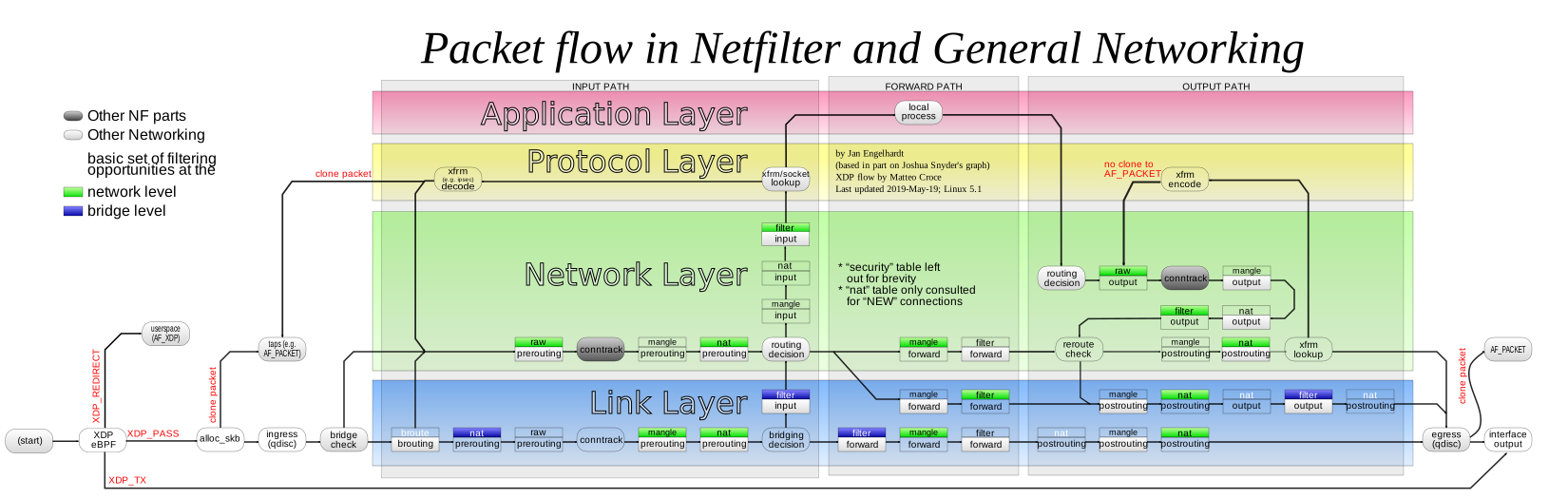
I personally don't believe this. IMO, this is a company who is looking for a fall guy, and _most likely_ it's going to be somebody who raised a stink about all the security problems during their time there.
Form your own opinion, I'm just a guy who worked at Ubiquiti for a year, raising all kinds of hell about the security, architectural, and operational problems that I saw while I was there.
But what do I know...