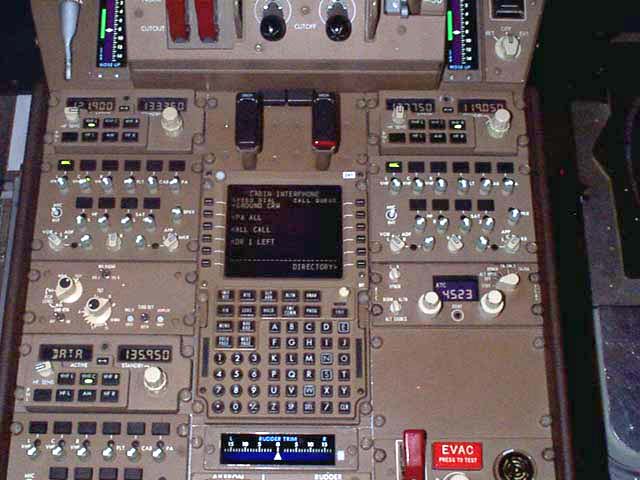
> Personally, I think information display can and should use touch interface, but actions should be tied to physical switches or buttons.
Underrated comment!
Information - the user is already looking at the screen, so they can touch virtual buttons. And that is probably the best approach, as they are manipulating information that is being displayed and they can see.
For actions, you won't necessarily have your attention on the screen. The information may not even be displayed in the screen yet, so now you have to divert attention and manipulate the system to get it to a state you can then change(eg, moving to the climate control screen).
Well keyboards are an interesting one. Airliners have space to install hardware keyboards, light aircraft don't so they have touch displays.
You could argue that an onscreen keyboard is significantly less mental load for the pilot than having to scroll letter by letter on a "dumb" interface.
Where do accidents happen? It's fairly rare for a plane to just break. And even then, if your electronics fail there are usually mechanical backups for the critical instruments. It's much more common for pilots to reach task saturation and make mistakes.
> You could argue that an onscreen keyboard is significantly less mental load for the pilot than having to scroll letter by letter on a "dumb" interface.
I don't buy that argument. What kind of keyboard? QWERTY or something else? What language? English is the language of aviation, but if you're not a native speaker who uses keyboards all the time then chances are you're going to have a LOT of mental load using a keyboard. Even something like the French or German keyboards, which use mostly the same letters, may be different enough to cause frustration -- and when you have an engine on fire you don't need to be struggling with those details.
Personally I think it's an awful idea. I just watched the promotional video that I expected to give some answers as to why this design decision was made and I frankly ended up even more worried.[1] I can accept that I'm somewhat of a luddite when it comes to this and I might be wrong, I just hope these are thoroughly tested and actually solve real world problems, and aren't just a way for Boeing to save money or solve the problem of "hey why aren't there any cool touchscreens in here".
If you're trying to say, lower the landing gear, and the button malfunctions, you can probably smack the button a few times until it works, failing that, rip the switch out and short the wires inside the switch and get the plane landed.
With a touch screen? What if the glass breaks and the capacitive layer fails? Or the software running the screen crashes? Or a bug prevents you from switching from the "Climate control" tab to the "Landing gear" tab?
There are three redundant methods to lower the landing gear on my aircraft, depending on whether you still have hydraulic ability available or not. It is not unique. One is a big, fat lever that will not go away with a hypothetical touchscreen option, since we pilots tend to like physical backups for flight-critical systems like that (though I’m curious what pc86 is flying upthread, since even the G1000 aircraft I’ve flown have usually had airspeed dials).
It is even totally possible to gravity drop landing gear on nearly all commercial airliners, I would expect, though I can only speak on the types I’ve rated on. I don’t see you asking “what happens if the landing gear lever fails?” which is actually a totally reasonable question, and one manufacturers have thought of. Touchscreens aren’t magic devices, they’re just another type of input to build redundancy behind.
It sounds like a horrible idea because you probably haven’t flown an aircraft and don’t know this. That isn’t an indictment of you, just a request to not judge so soon. I like the idea of screens that adjust to phase of flight so what I need is where I need it, because pilot workload is a real problem that automation has addressed for decades.
> One is a big, fat lever that will not go away with a hypothetical touchscreen option
Thanks for the explanation -- This makes me feel much safer as a passenger if the touch screen is provided to you as a convenience instead of a replacement. Yep, I haven't flown an aircraft. I was thinking that it was like a car where they are getting rid of physical knobs and replacing them with touchscreen-only interfaces which I hate.
> If you're trying to say, lower the landing gear, and the button malfunctions
If you're trying to lower the landing gear, and the button malfunctions, you use the gravity gear extension handle, which is a completely independent system. You can also land without the landing gear in the worst case.
> What if the glass breaks and the capacitive layer fails? Or the software running the screen crashes? [...]
You use the other screen, which is controlled by the other computer. There are also knobs to switch which computer controls each screen. In the worst case, there are the standby instruments.


Personally, I think information display can and should use touch interface, but actions should be tied to physical switches or buttons.